Cirrux Calendar is here
September 2, 2026
Hi everyone,
I'm happy to announce that Cirrux Calendar is available now and I'm pretty happy with it. It's a fast, fluid and clean way to see what's ahead.
Let me give you a quick tour, starting with the week view:
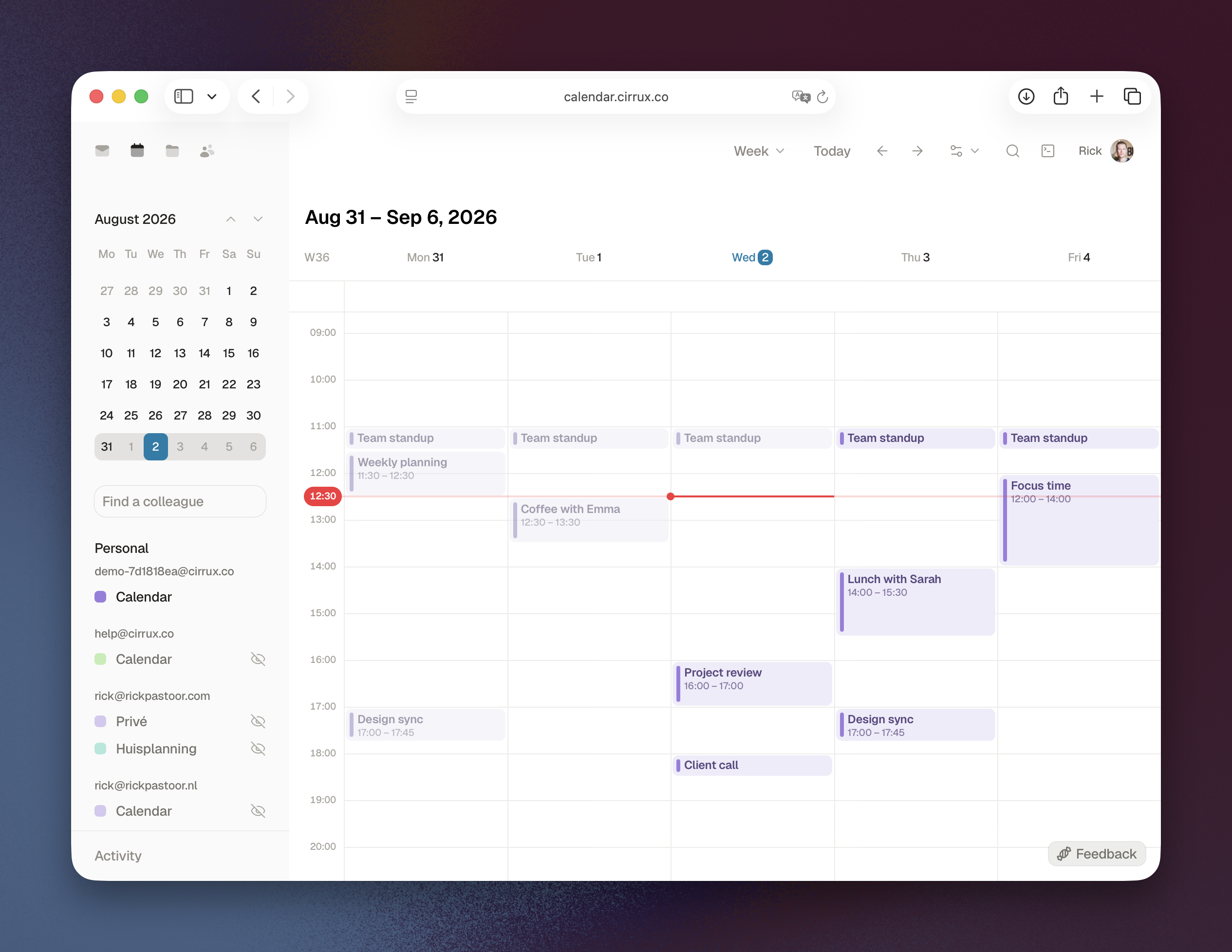
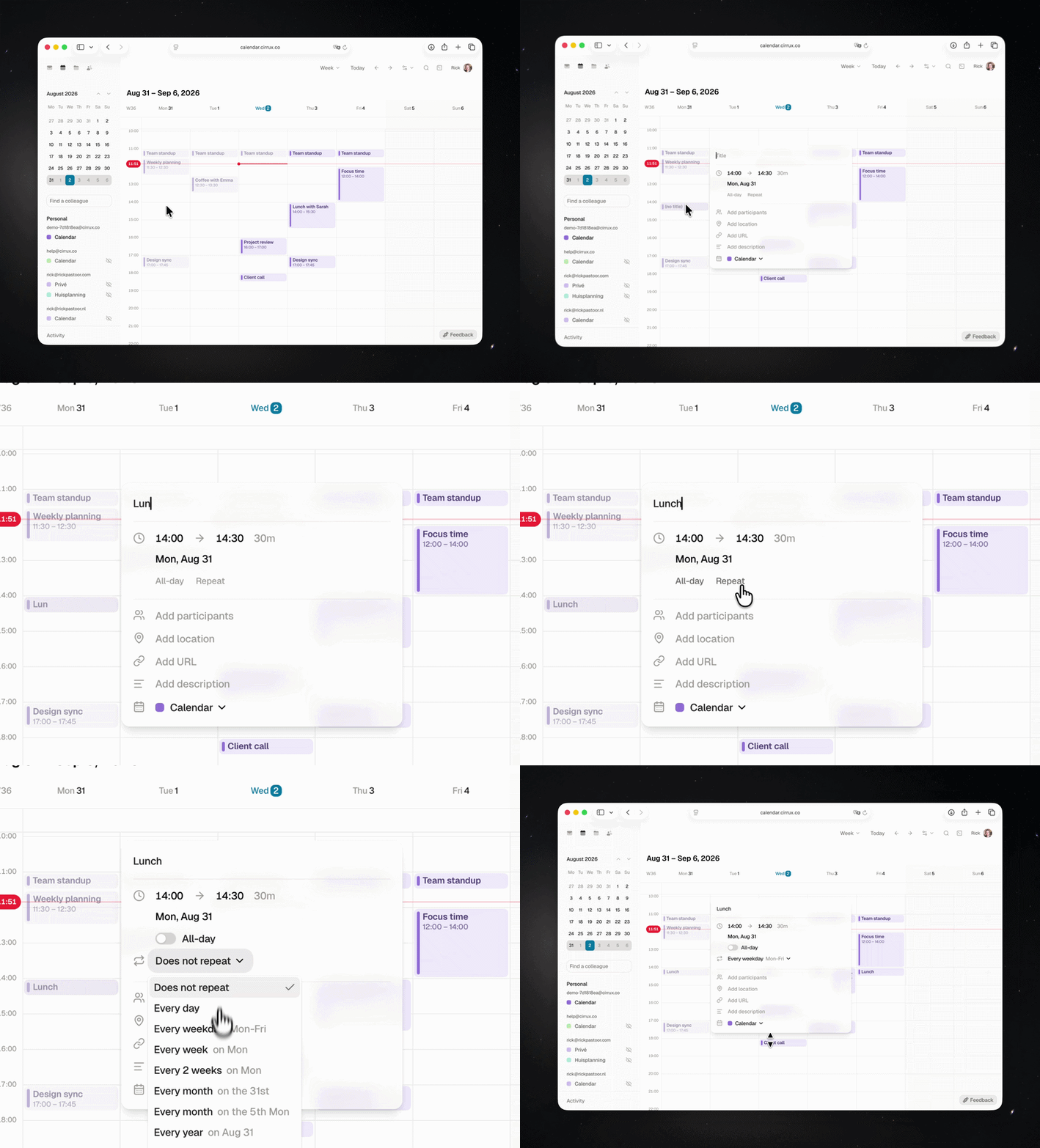
At a first glance it looks like any other calendar. But as you interact, you'll notice it's fast. Clicks, drags and scrolls are really smooth, even with packed days. Updating events can be done by updating in the popup, or by dragging events around. Here's how that feels:
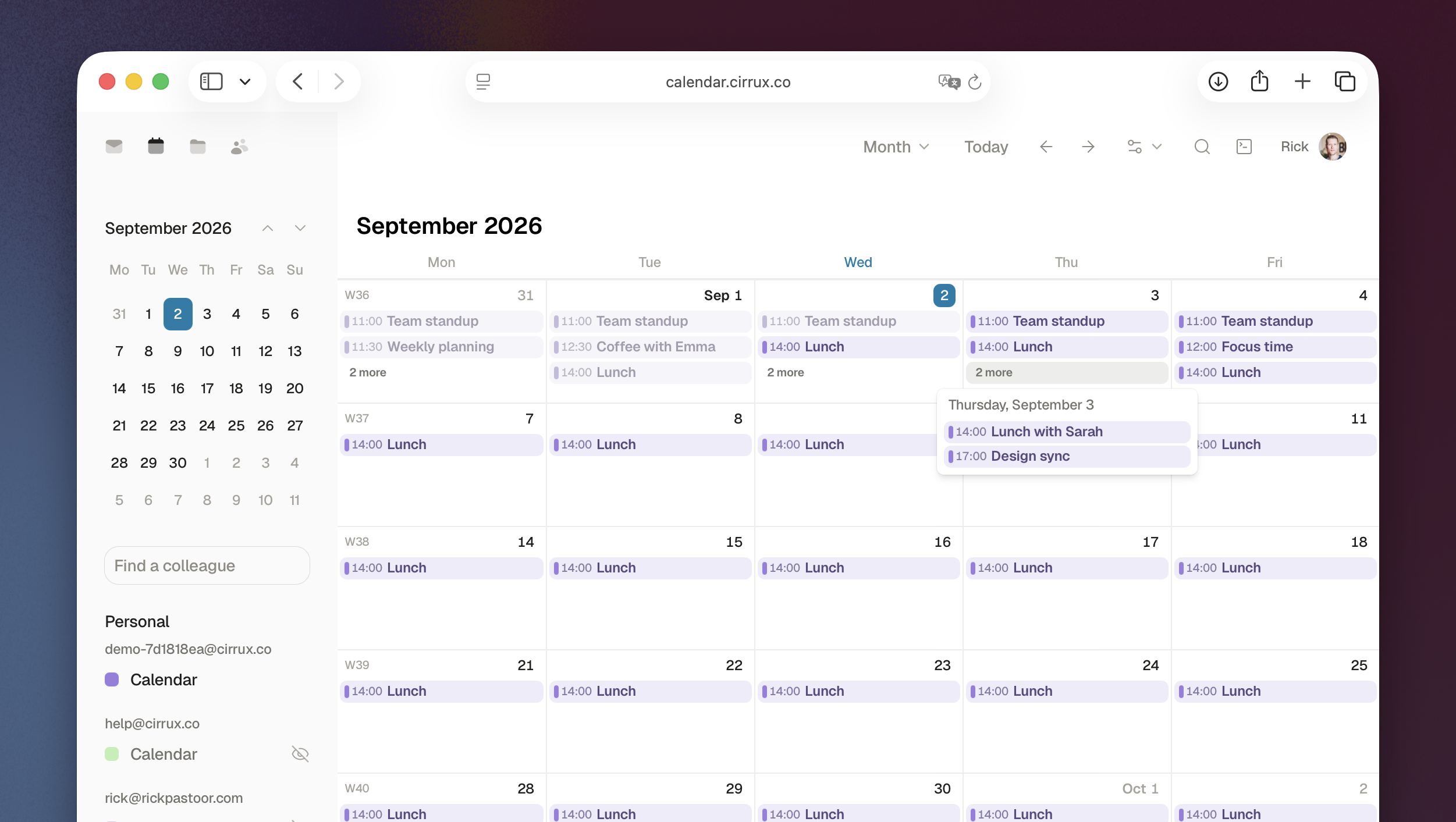
There's also a pretty month view:
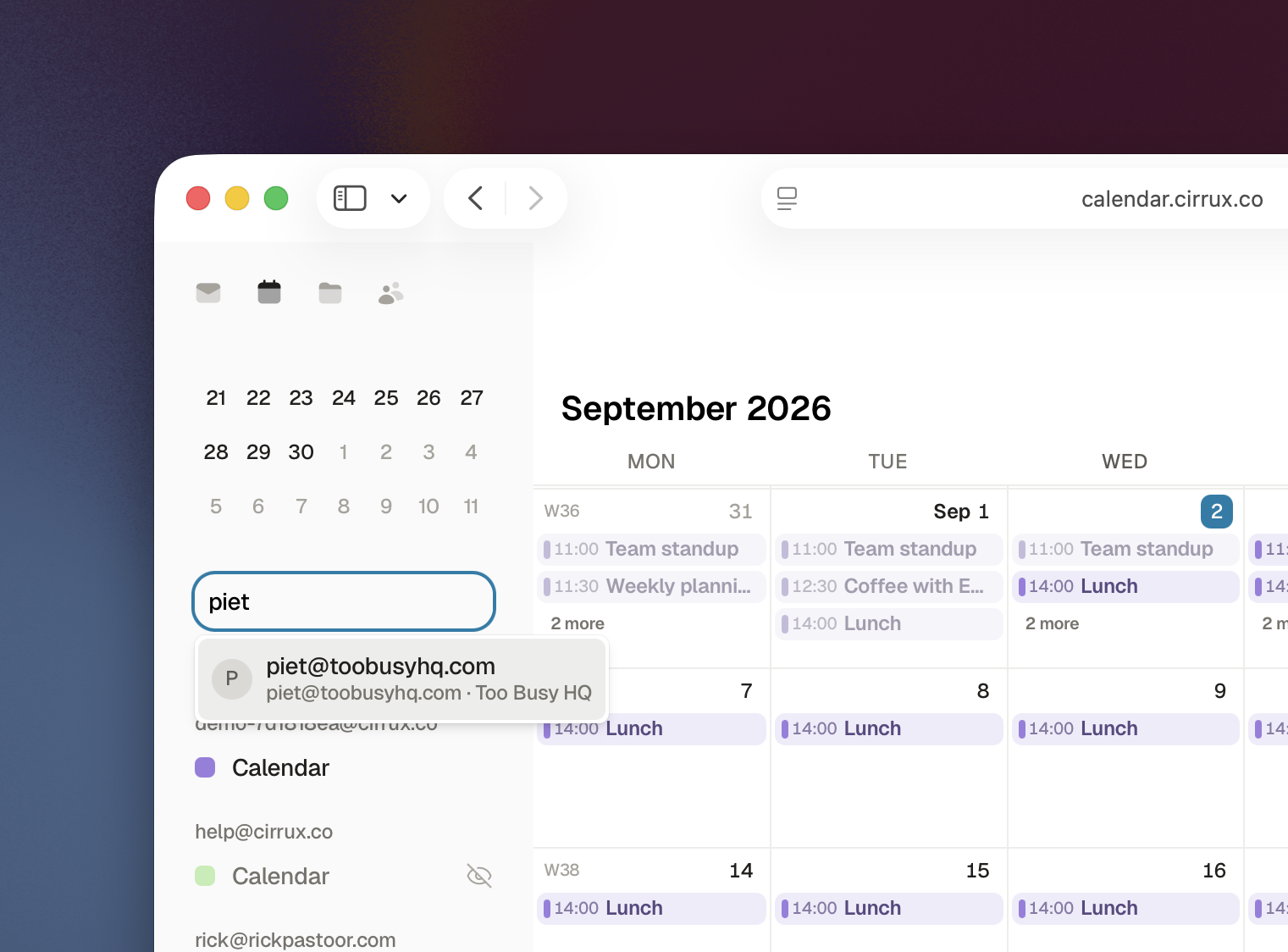
And if you're sharing your Cirrux workspace, you can pull up and subscribe to the calendar of a colleague with a few taps:
Under the hood, invites work the way you'd expect: add guests, they get an invitation by email, and their responses come back into the event. Recurring events, exceptions to a series, timezones and all-day events are all handled by the same engine that powers our CalDAV server, so your iPhone, iPad, Mac and Thunderbird all see exactly what the web app sees.
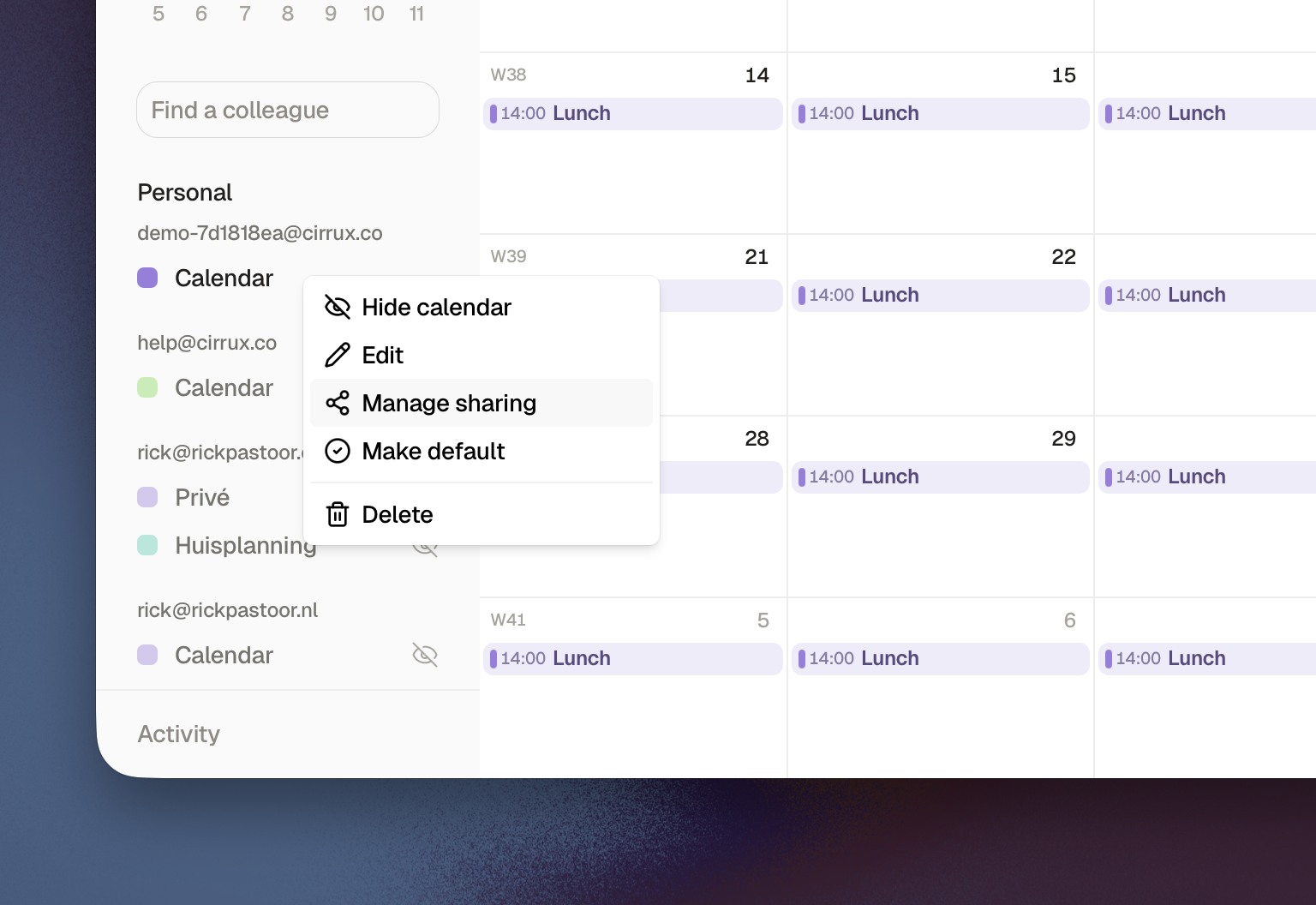
Sharing moved into the calendar itself. Right-click a calendar in the sidebar and you can add someone from your workspace as a viewer or an editor, or switch on a secret iCal link that Google Calendar and Outlook can subscribe to. Editing and deleting a calendar live in that same menu now.
There's a lot more:
- Search through all your events by pressing
/or clicking the search icon - Calendar is fully dark mode ready and it will automatically adapt to your system settings (you can always change your theme via cmd+k/ctrl+k → Change theme...)
- If you want to jump to a specific date quickly, press
. - There's a list view too!
- You can change your time formatting and start of your week, as well as show/hide weekends
Even though it's already pretty featurecomplete, please let me know if you miss something or if something appears broken. I'll jump on it!
Read the full Cirrux Calendaring documentation →
Your calendar in the CLI
The Cirrux CLI is also jumping on the scheduling bandwagon! It can read your calendars now, so your AI can answer "what's on my calendar tomorrow" without you handing over anything else.
It's read-only for now, but write access to create and update events, and respond to invites is up next.
One note: if you were already logged in with the CLI, you need to log in again to grant the new scope. The CLI will tell you when it hits that.
I'm already getting stories from folks who are using the CLI to triage their inboxes and to help them prioritize, adding the calendar really helps to get an even better view of what is going on.
Fixes and improvements
- Improvement: All Cirrux apps download data when you open them up for the first time. This used to take a few seconds, but should be a lot faster now.
- Improvement: Every app has its own icon now, so the browser tab and your dock tell you at a glance whether you're looking at Mail, Calendar or Drive.
- Improvement: If you invite someone to your workspace and they already have a Cirrux account, they can now join with that account instead of being forced to create a second one. Everything stays in one place.
- Improvement: A popped out composer no longer covers the bottom of what you're reading. The page grows by exactly the height of the draft, so you can still scroll a thread all the way through while writing your reply.
- Improvement: Inline images in an email are clickable. Click one and it opens full size in the lightbox, where you can page through the other images in that email and download any of them.
- Improvement: Switching between day, week and month view keeps the date you were looking at in view, instead of jumping somewhere else.
- Improvement: In month view, clicking an empty slot while an event popover is open just closes the popover. It used to create a new event, which was never what you meant.
- Improvement: Workspace admins can reset a member's password. This is for accounts that were provisioned without an email address, where neither the member nor I had a way back in. It requires the admin's own password and it signs the member out everywhere.
- Improvement: Signatures and app passwords for a member can be managed from the workspace admin console at admin.cirrux.co, which is handy when you're setting up someone's mail client for them.
- Improvement: On a domain in the admin console there's a Copy as BIND button that gives you all your DNS records as a zone file, ready to paste into a real DNS server instead of clicking through a web panel record by record.
- Improvement: Workspaces and mailboxes are sorted the same way everywhere in the apps, so the order stops changing under you.
- Fixed: Signatures with images hosted somewhere else (added through HTML mode) showed up broken. We now pull those images onto our own infrastructure when you save the signature, so they render in the app and in the mail you send.
- Fixed: Editing a single occurrence of a recurring event that had guests on it could fail with a server error.
- Fixed: Jumping to today in month view didn't always land on today.
- Fixed: Calendar sharing didn't work when you were the owner of the mailbox the calendar belongs to.
- Fixed: The editor didn't mount correctly in Firefox.
- Fixed: Undoing the deletion of an HTML block in the editor could crash the composer.
- Fixed: Refresh token rotation is atomic, so two clients refreshing at the same moment can't knock each other out of a session.
- Fixed: Signing up with an address that already exists now tells you what's wrong instead of failing silently.
What's next
- Cirrux Docs: Started. The app shell and the document editor page are standing up, and I'm working through the editor itself. This is the most requested thing on the list.
- Sync for Outlook: Still the last big migration path. IMAP, vCard and ICS import already get you moved, but ongoing sync would make it painless.
One last thing: as an experiment I just added buttons to directly reach out to me over Telegram or Signal on cirrux.co. I really hate it that it's usually super hard to talk to a person whenever I'm considering a new product. Or, even worse, being pushed to talk to an AI bot. Lets see how long I can keep this direct line going. Come say hi!
If you've been waiting for the calendar, now is the moment to move it over. The ICS import guide has the export steps for every provider, and Google Sync can mirror your Google calendars automatically while you transition. As always, if a migration feels daunting, mail me and I'll help.
Have a great week,
Rick